A Branching Narrative Tool for Game Writers
StoryFlow Editor is a visual branching narrative tool and interactive fiction editor. Build the story as a node graph, track state with variables, play it as you write, then export to a playable HTML file or straight into Unity, Unreal Engine and Godot.
What is a branching narrative tool?
A branching narrative tool is software for writing stories where the audience makes choices that change what happens next. Rather than one linear script, you author a graph. Dialogue leads to choices, choices lead to branches, and variables remember what the player did so later scenes can react to it.
The hard part is not the first branch. It is the fiftieth. Every binary choice doubles the number of paths you have to write, test and keep consistent, and a story that was comfortable at 30 nodes becomes unreadable at 300. That is the problem a good narrative tool exists to solve: it keeps the structure visible, makes state explicit, and lets you play any path without rebuilding the whole game.
The same category gets called a few different names depending on where the story ends up. Writers coming from Twine tend to say interactive fiction editor. Developers building an RPG tend to say dialogue system or narrative tool. The underlying job is identical.
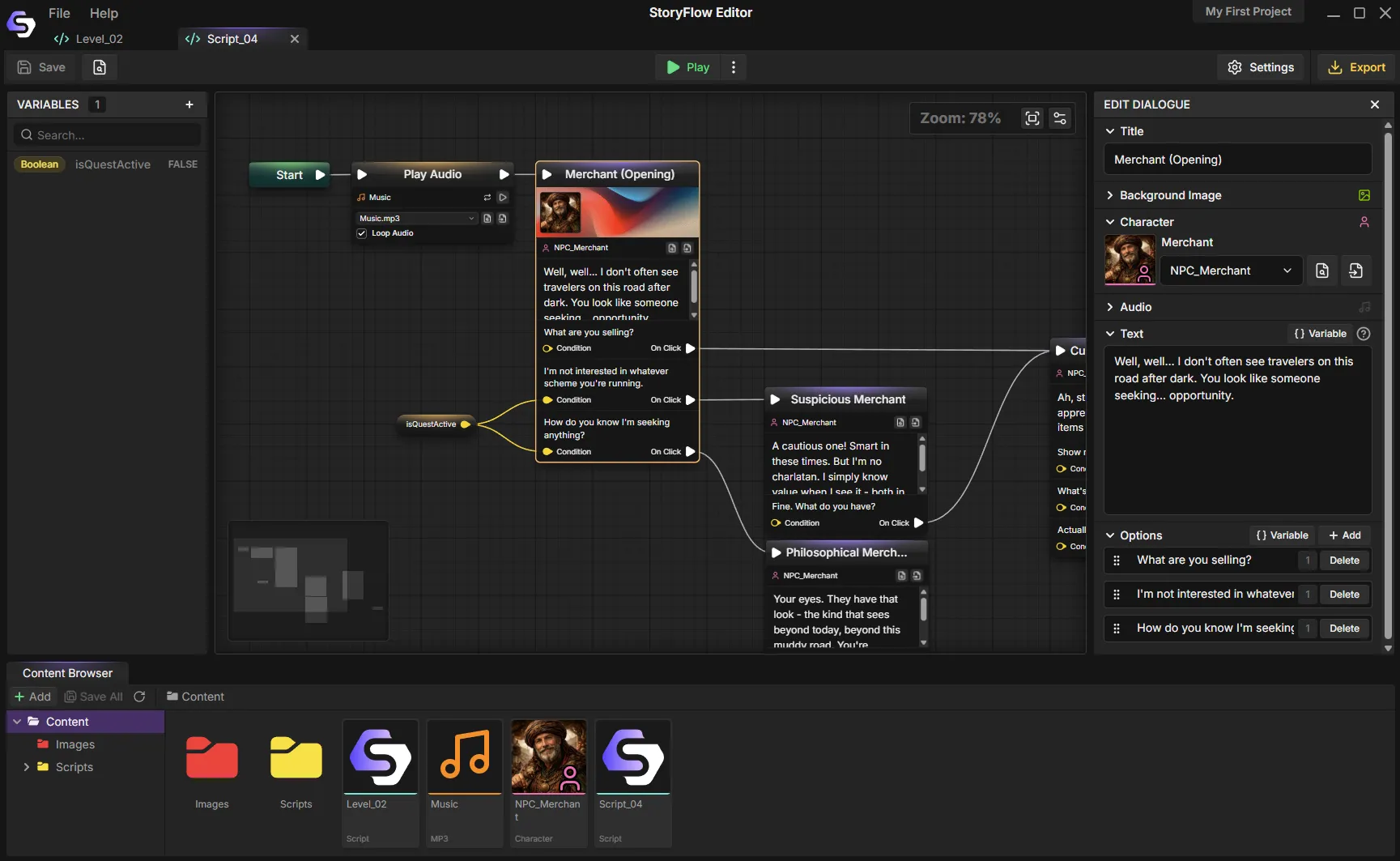
A branching story on the StoryFlow canvas. Dialogue, choices and conditions as connected nodes.
What to look for in a branching narrative tool
Six things that decide whether a tool still works once the story gets big.
A canvas that stays readable
Branching stories get wide fast. A node graph with grouping, search and a minimap keeps a 500-node story navigable, where a text script or a folder of scenes stops being scannable around the point it matters most.
Variables and conditions without code
Real branching needs memory. Look for typed variables, conditional branches and boolean logic you can wire visually, so a writer can gate a scene behind an earlier choice without asking a programmer.
Play it while you write it
The gap between writing a branch and seeing it run is where mistakes hide. Play in Editor and Live Sync help you test changes as you write. In Unreal, stop play before syncing the updated project.
An export you actually own
Playable HTML and a JSON project export make the story portable. You can put a prototype on itch.io and later import the project build into an engine.
Engine plugins that are not an afterthought
A narrative tool is only as good as its handoff. Free, open-source runtimes for Unity, Unreal Engine and Godot import the same StoryFlow Editor project build.
Git-friendly project files
Text-based project files diff and merge. Proprietary binary formats make code review and branching workflows painful for small teams who already live in Git.
For a tool-by-tool breakdown of how StoryFlow, articy:draft, Arcweave, Twine, Ink and Yarn Spinner score against these criteria, see the full narrative design tools comparison. If you are moving off a specific tool, there are focused write-ups for Twine, Ren'Py and articy:draft.
Writing for branching narratives
Writing a branching story is a different craft from writing a linear one, and most of the difficulty is structural rather than prose. Three patterns do the heavy lifting.
Branch and bottleneck. Paths diverge for a scene or two, then rejoin at a fixed story beat. The player feels agency, you keep a finite amount of content to write. This is the workhorse pattern for most commercial branching games.
Hub and spoke. A central location or scene links out to optional content the player can take in any order. Adding a new spoke costs one scene rather than doubling the tree.
State over structure. Instead of writing two branches, write one scene that reads a variable and swaps a few lines. Tracking a flag is far cheaper than maintaining a parallel path, and it is what makes a story feel like it remembers you.
The branching dialogue guide works through all five architectures in detail, including when each one breaks down.
From editor to engine
A narrative tool is only as useful as its handoff. StoryFlow Editor exports one project build that three free, open-source runtime plugins can import, so the narrative does not need to be rebuilt per platform.
- Unity. C# runtime with an event-driven API and a default uGUI dialogue widget you can replace.
- Unreal Engine. Blueprint-friendly plugin for UE5 with full C++ access for custom work.
- Godot. Pure GDScript add-on for Godot 4 with typed signals, no C# dependency.
- Playable HTML. One-click standalone build for itch.io, playtests or a portfolio piece, with no engine involved.
Request a Live Sync to send project changes over WebSocket. Follow the workflow for your engine: Unreal requires you to stop Play In Editor before syncing, then start play again. In Godot, restart the game after syncing to load the updated files.
Frequently Asked Questions
What is a branching narrative tool?
A branching narrative tool is software for writing stories where the reader or player makes choices that change what happens next. Instead of a single linear script, you author a graph: dialogue leads to choices, choices lead to different branches, and variables track what the player did so later scenes can react. The tool's job is to keep that structure readable as it grows, and to hand the finished story to a game engine or a playable build.
What is the difference between a branching narrative tool and an interactive fiction editor?
In practice they overlap heavily and many people use the terms interchangeably. Interactive fiction editor usually implies the output is text the reader plays in a browser, in the tradition of Twine and parser games. Branching narrative tool usually implies the story is destined for a game engine, where the dialogue drives characters, audio and UI. StoryFlow Editor does both: it exports a playable HTML build and a JSON project build that the free Unity, Unreal Engine and Godot plugins import.
Do I need to write code to use a branching narrative tool?
It depends on the tool. Ink and Yarn Spinner are scripting languages, so branching logic is written as text with their own syntax. Twine sits in the middle, visual for structure but expecting markup for real logic. StoryFlow Editor keeps branching fully visual: choices, conditions and variables are nodes you connect on a canvas, so a writer can build and test a branch without touching a scripting language.
How do you keep a branching story from becoming unmanageable?
The failure mode is exponential growth: every binary choice doubles the paths you have to write and test. The tools that scale use structural patterns rather than pure branching, mainly branch and bottleneck, where paths diverge then rejoin at a fixed point, and hub and spoke, where a central scene links out to optional content. Variables also do a lot of work: instead of writing two branches you write one scene that reads a flag and changes a few lines.
Can a branching narrative tool export to Unity, Unreal Engine or Godot?
Some can. StoryFlow Editor ships free, open-source runtime plugins for Unity, Unreal Engine 5 and Godot 4. They import the same project build with scripts, characters, Data Assets and translations, play supported story nodes natively and provide save and load APIs. Request a Live Sync to send edits to the engine project. Unreal requires you to stop play before syncing. Godot loads the updated files on the next game launch. Ink and Yarn Spinner have engine integrations too. Twine is browser-first and needs a third-party runtime to run inside an engine.
What does StoryFlow Editor cost?
StoryFlow Editor is a one-time $30 purchase on Steam or itch.io, with lifetime updates and no per-seat or subscription fees. The engine plugins for Unity, Unreal Engine and Godot are free and open-source. A free demo is available on Steam if you want to try the workflow first.
Start your branching story
StoryFlow Editor is a one-time $30 purchase on Steam and itch.io, with free engine plugins and lifetime updates. The Steam demo is free if you want to try the workflow first.
Join the Community
Connect with StoryFlow Editor users, share your projects, leave feedback, vote for new features, report bugs and get support in our Discord community.
Join Discord