
The Branching Dialogue Nightmare: Why Your First Dialogue System Will Fail (And How to Fix It)
Branching dialogue breaks because narratives scale exponentially while procedural code scales linearly: three choices across five conversations already produce 243 paths (35), and a binary tree 10 levels deep has 1,024 endpoints. Shipped games avoid the collapse with one of five architectures that actually scale:
- Linear with Branches - one main path, choices that mostly dead-end (horror, thrillers; e.g. Until Dawn).
- Branch and Bottleneck - branches reconverge at fixed beats (most RPGs; Mass Effect, Dragon Age, The Witcher).
- Hub and Spoke - a central node with optional topics in any order (investigation games; Disco Elysium).
- Parallel Tracks - independent relationship meters that occasionally cross (romance and companion systems).
- Node Graph - any node connects to any node, the most flexible and most complex (Inkle's 80 Days, Heaven's Vault).
The fix that underlies all five: separate dialogue data from game logic, treat the system as a state machine, and pick the pattern that matches your story. If you are already deep in if/else, jump to the four-step refactor. If you build in an engine, the free StoryFlow plugins for Unreal Engine 5, Unity and Godot 4 run the graph natively, no nested conditionals required.
Key Takeaways
- The cause is architectural, not skill. Exponential branching cannot be held in linear code past ~100 nodes.
- Separate data from logic on day one. Dialogue belongs in a file or graph, never hardcoded in C#, C++ or GDScript.
- Your dialogue system is a state machine. A dialogue tree holds the branches; variables (quests, reputation, flags) gate them.
- Use values, not booleans, for relationships. "Reputation: 47" scales where "isLiked: true" does not.
- Pick one of the five patterns to match the story, then export the graph and let a runtime play it in Unreal, Unity or Godot.
- Refactor incrementally - one conversation at a time, so a mistake costs a scene, not a multi-month rewrite.
The rest of this guide is the long version: why dialogue trees fail, what each of the five architectures does, why visual node systems prevent the explosion, and how to dig out if you are already stuck. Here is the part nobody tells you when you start: this exact pattern destroys a large share of first implementations, and your architecture was doomed before you wrote the first line.
Welcome to the branching dialogue nightmare. Let's fix it.
The Anatomy of a Dialogue Nightmare
I want you to picture something. You're building an RPG. You've got an NPC merchant who has different dialogue based on:
- Whether the player has met them before
- The player's reputation in town
- Whether they've completed the blacksmith's quest
- Their current inventory
- Time of day
- Whether they've been rude in past conversations
That's six boolean flags. Seems manageable, right?
Here's what your code probably looks like:
if (hasMetBefore) {
    if (reputation > 50) {
        if (hasCompletedBlacksmithQuest) {
            if (hasSpecialItem) {
                if (timeOfDay == "morning") {
                    if (!wasRudeBefore) {
                        // Show friendly morning dialogue
                    } else {
                        // Show cold morning dialogue
                    }
                } else {
                    // Evening dialogue branches...
                }
            } else {
                // No special item branches...
            }
        } else {
            // Quest not completed branches...
        }
    } else {
        // Low reputation branches...
    }
} else {
    // First meeting dialogue...
}
And that's just ONE conversation with ONE NPC.
Now multiply that by every character in your game. Every quest state. Every story beat. The math gets ugly fast: three choices per conversation, across five conversations, gives you 243 possible dialogue paths. And that's the simplest possible branching structure.
This is the "Big O' If/Else" anti-pattern, and it kills more dialogue systems than any other mistake. It is also exactly why large studios abandoned hand-written conditionals years ago. In his 2012 GDC talk "AI-driven Dynamic Dialog through Fuzzy Pattern Matching", Valve engineer Elan Ruskin described the system behind Left 4 Dead 2, Team Fortress 2 and DOTA 2: instead of branching code, it matches thousands of facts about the game world against a rule database to pick the right line. The whole point, in Ruskin's words, is that "the more easily [writers] can iterate, the more autonomous they can be... the better dialog you will have." That only works when dialogue is data, not code.
The Five Warning Signs You're Headed for Disaster
You might be sitting there thinking, "Yeah, my code's messy, but I can manage it." Let me give you the five warning signs that you're about to hit the nightmare:
1. You're hardcoding dialogue strings in your game logic. If your dialogue text lives in the same files as your Unity/Godot/Unreal scripts, you're building technical debt. Writers can't edit. Localization is impossible. You're locked in.
2. You're copy-pasting the same dialogue for different branches. When the guard says "Halt!" in three different if-statements, and you need to change it, you'll miss one. Then your QA tester finds it six months later.
3. You can't visualize your full conversation tree. If someone asked you to draw your dialogue structure on a whiteboard, could you? If not, you don't actually understand what you've built. And if you don't understand it, you can't maintain it.
4. Testing requires 30-minute playthroughs. You changed one line of dialogue. Now you need to replay the entire game to reach that conversation to test it. This is the death spiral - you stop testing because it takes too long, so bugs accumulate.
5. You're afraid to change anything. The fragility fear. You need to add a new quest flag, but you're terrified it'll break six conversations you've forgotten about. So you just... don't add it. Your game gets smaller because your code got scary.
Sound familiar? Then let's talk about why this happens.
Why Dialogue Trees Fail: The Three Core Problems
Problem 1: Exponential Branch Explosion
Here's the math that kills dialogue systems. In a simple binary tree (yes/no choices), the number of possible endpoints grows exponentially with depth:
- Depth 5: 32 possible endpoints
- Depth 10: 1,024 possible endpoints
- Depth 15: 32,768 possible endpoints
And that's with just YES or NO choices. Give the player three options, and depth 10 becomes 59,049 possible paths.
Now think about an RPG. Every NPC needs dialogue for every quest state. If you have 20 NPCs and 10 quest states, that's theoretically 200 conversation variations. But quests interact - completing Quest A changes dialogue in Quest B. Now you're tracking combinations. The explosion happens faster than you expect.
Most developers don't see this coming because they think linearly. "I'll just add one more choice here..." But that one choice doesn't add one more path - it doubles the number of paths downstream from it.
Studios that ship choice-heavy games never let the raw explosion stand. Supermassive Games' Until Dawn (2015) markets a "Butterfly Effect" system where every choice can change the story, yet under the hood the branches are deliberately bounded - most consequences are deferred and the cast funnels back through shared scenes. The exponential math is the default; staying shippable is a design choice you have to make on purpose.
Problem 2: State Management Chaos
Your dialogue system isn't just showing text - it's a state machine managing:
- Which lines the player has seen
- Which choices they've made
- Which items they have
- Which quests they've completed
- NPC relationships and reputation
- World state (is the town under attack?)
- Character state (is the companion in the party?)
Most first-time implementations track this with boolean flags:
bool talkedToMerchant = false;
bool merchantAngry = false;
bool merchantQuestComplete = false;
bool merchantKnowsSecret = false;
bool playerBefriendedMerchant = false;
This works until you have 200 booleans spread across 15 scripts, and you can't remember which flag controls which conversation, or what happens when two contradictory flags are both true.
Your dialogue system IS a state machine - you need to treat it like one.
Problem 3: Data-Code Coupling
Here's the scenario that breaks most teams:
Your writer needs to change "Hello, stranger" to "Hello, traveler" in 40 conversations. But the dialogue is hardcoded in C# scripts. So either:
- The writer asks the programmer to make 40 changes (slow, frustrating)
- The writer learns to edit code (risky, error-prone)
- The change doesn't get made (quality suffers)
And when you want to localize to Spanish, German, and Japanese? You need to edit code in three languages. Version control explodes. Merge conflicts become hourly events.
Separating data from logic isn't optional - it's the foundation of a functioning dialogue system.
The Five Dialogue Architectures That Actually Work
Enough doom. The structural patterns below are not invented here. Narrative designer Sam Kabo Ashwell catalogued the recurring shapes of choice-based stories in his widely cited 2015 essay "Standard Patterns in Choice-Based Games", naming structures like the Gauntlet, Branch and Bottleneck, and the spoke-and-hub Loop and Grow. These are the five that ship most often in real games. Match the pattern to the story, not the other way around.
| Approach | How it works | Scales to | Engine fit |
|---|---|---|---|
| Linear with Branches | One main path; choices mostly dead-end or fail | Tens of nodes | Trivial in any engine; plain script or state enum |
| Branch and Bottleneck | Branches diverge, then reconverge at fixed beats | Hundreds of nodes | Data file + variables; the default for RPGs |
| Hub and Spoke | Central node; optional topics exhausted in any order | Hundreds of nodes | Visual graph strongly preferred |
| Parallel Tracks | Independent relationship meters that occasionally cross | Many tracks × NPCs | Integer/float variables, not booleans |
| Node Graph | Any node connects to any node; conditions on each | Thousands of nodes | Visual node editor effectively required |
1. Linear with Branches (The Gauntlet)
What it is: A single main path with occasional choices that mostly lead to failure states or minor variations. Think of it like a gauntlet - most branches are dead ends.
When to use it: Horror games, thriller narratives, puzzle-based stories where you want tension and the feeling that choices matter without actually managing massive branching.
Example: Until Dawn does this beautifully. Most choices lead to character death (failure state), but the main story continues. The illusion of branching is powerful, but the actual complexity is manageable.
Implementation: Simple tree structure. Track the current node, handle choice outcomes (continue or game over), maintain minimal state. This is the easiest pattern to implement in code:
DialogueNode currentNode;

void ShowDialogue() {
    Display(currentNode.text);
    foreach (var choice in currentNode.choices) {
        if (choice.isGameOver) {
            // Lead to failure state
        } else {
            currentNode = choice.nextNode;
        }
    }
}
Pros: Simple to build, easy to test, clear narrative structure
Cons: Limited player agency, can feel railroaded if done poorly
2. Branch and Bottleneck (The Illusion)
What it is: The story branches based on player choices, but branches reconverge at key story beats. You get the feeling of agency without exponential growth.
When to use it: This is the most common pattern in RPGs. Mass Effect, Dragon Age and The Witcher all use branch and bottleneck. BioWare leaned on it so heavily that it patented the tone-based dialogue wheel that fronts it (US Patent 8,082,499, "Graphical interface for interactive dialog," granted 2011), where Paragon and Renegade options sit in fixed positions and feed a small set of canonical outcomes.
The key insight: Players remember emotional moments, not exact dialogue lines. If Choice A and Choice B lead to slightly different dialogue but the same outcome, players feel like their choice mattered.
Implementation: Track major decision points. Use conditional flavor text for branches, but funnel to the same next major scene:
// Both choices lead to the castle, just different dialogue
if (playerChoiceWasAggressive) {
    ShowDialogue("You storm in, guards look nervous...");
} else {
    ShowDialogue("You enter peacefully, guards nod...");
}
// Then both continue to:
StartCastleScene();
Pros: Feels responsive, manageable complexity, gives you narrative control
Cons: Players might notice branches merging if done clumsily
The honest truth: Most "branching" RPGs use this pattern. Your choices change how you get to Plot Point B, but you're still going to Plot Point B. And that's okay - it works.
3. Hub and Spoke (The Modular Approach)
What it is: A central hub (like a town or main menu) where players can access multiple independent story branches in any order.
When to use it: Investigation games, open-world RPGs, any game where player exploration drives narrative rather than linear progression. ZA/UM's Disco Elysium (2019) is the gold standard, and its scale shows why the hub pattern matters: the script runs to over a million words, and 24 character skills act as internal voices that surface as optional dialogue checks. None of that is navigable as nested code; it only works as a graph of topics you exhaust in any order.
Implementation: Topic-based conversations. Track which topics are unlocked, let players exhaust them in any order:
class HubConversation {
    List<Topic> availableTopics;
    HashSet<Topic> discussedTopics;

    void ShowHub() {
        foreach (var topic in availableTopics) {
            if (!discussedTopics.Contains(topic)) {
                DisplayOption(topic.name);
            }
        }
    }
}
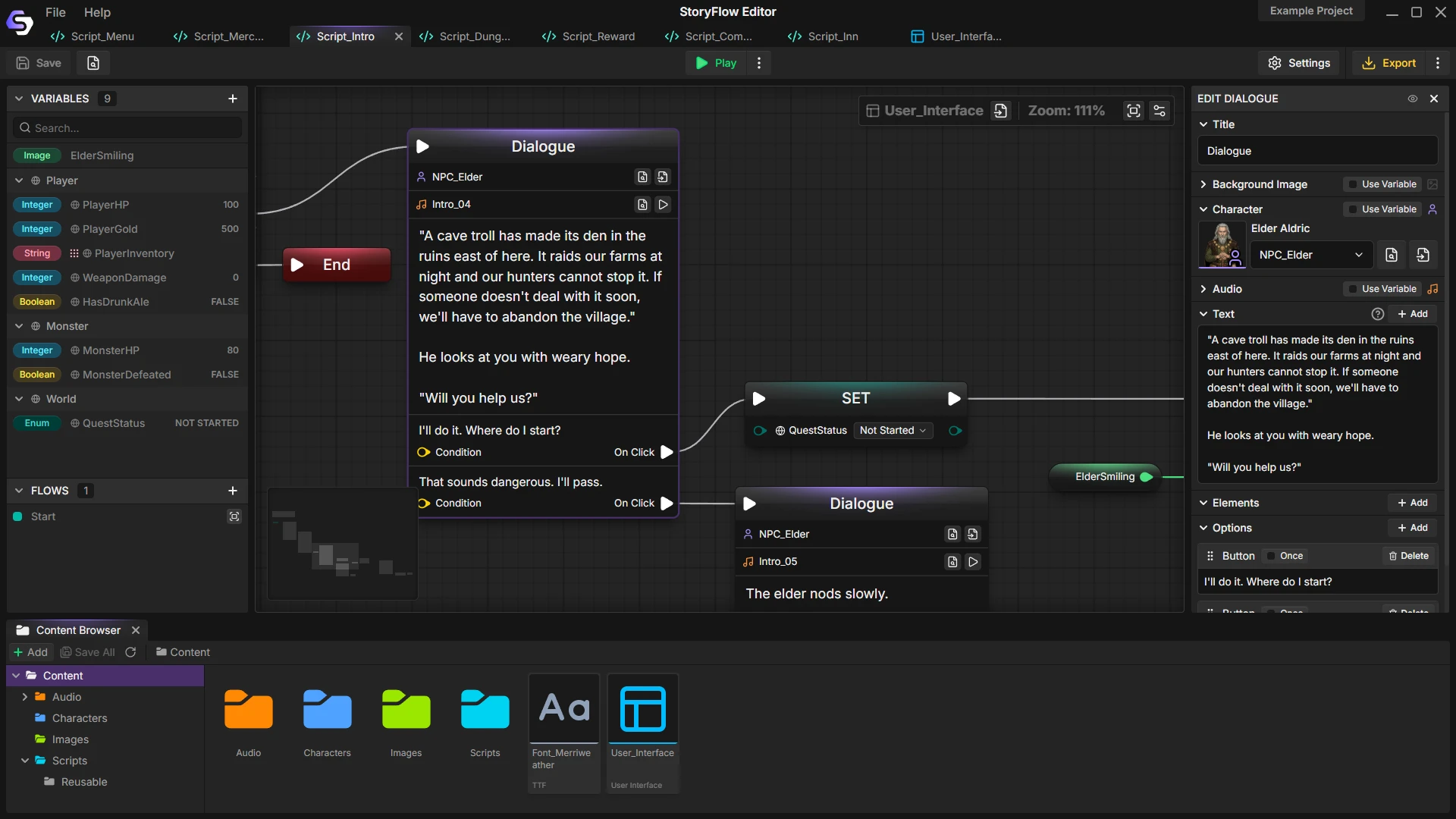
This pattern is perfect for visual node editors because you can literally see the hub-and-spoke structure. In StoryFlow Editor, you'd build this by creating a central hub node with connections radiating out to topic branches, and all branches return to the hub. It's immediately clear what's connected to what.
Pros: Flexible, respects player agency, scales well
Cons: Requires careful gating to prevent information overwhelm
4. Parallel Tracks (The Relationship System)
What it is: Multiple independent storylines running simultaneously that occasionally intersect. Think romance systems, faction reputation, companion stories.
When to use it: Any game with relationship mechanics. Dragon Age's romance + main story. Mass Effect's companion loyalty + main plot.
Implementation: Track relationship values (not booleans - use integers or floats for granularity). Different thresholds unlock different dialogue:
class Relationship {
    int affection; // -100 to +100

    string GetGreeting() {
        if (affection > 75) return "My dear friend!";
        if (affection > 25) return "Good to see you.";
        if (affection > -25) return "Oh, it's you.";
        return "What do you want?";
    }
}
Pros: Emergent storytelling, high replay value, players feel relationships evolve
Cons: Can be expensive to write (every NPC needs progression)
Pro tip: Track values, not booleans. "Reputation: 47" gives you way more flexibility than "isLiked: true".
5. Node Graph (Full Complexity)
What it is: A true graph structure where any node can connect to any other node. Maximum flexibility, maximum complexity.
When to use it: Complex choice-based games with lots of branching, looping conversations, and state-dependent dialogue. This is the territory of Inkle's ink, the narrative scripting language behind 80 Days and Heaven's Vault that the studio open-sourced under the MIT license in 2016. Inkle reports ink has driven "literally millions of words of highly branching narrative" - a scale that only stays authorable because the structure is a graph, not a call stack.
Implementation: This is where you NEED visual tools or a graph database. Trying to manage this in linear code is the nightmare we started with.
In a node graph, each dialogue node knows about:
- Its text
- Conditions for appearing (flags, items, stats)
- Its available next nodes
- Effects when displayed (set flags, give items)
class DialogueNode {
    string text;
    List<Condition> requirements;
    List<DialogueNode> nextNodes;
    Action onDisplay;
}
This is where StoryFlow Editor really shines. When you're managing 200+ nodes with complex interconnections, seeing it as a visual graph isn't just convenient - it's necessary. You can spot problems immediately: "Oh, this branch has no exit." "These three paths all lead to the same dead end." "This section is totally disconnected from the main flow."
Pros: Unlimited flexibility, handles any narrative structure
Cons: Complex to build, requires sophisticated tools, can be overwhelming
Visual Scripting vs. Code: Why Node Editors Prevent the Nightmare
Here's something I wish someone had told me five years ago: Visual editors aren't just "easier" - they fundamentally prevent architectural mistakes.
Let me explain what I mean.
The Cognitive Mismatch Problem
Humans think spatially. When you're planning a dialogue system, you naturally draw a flowchart. Boxes and arrows. Branches splitting and merging. You see the structure.
But then you implement it in code, which is linear text. Read top-to-bottom. You lose the spatial understanding that made sense when you were planning.
The mismatch between how you PLAN narratives and how you IMPLEMENT them creates bugs.
This is not a fringe opinion. Inkle built ink as a writer-facing layer precisely so authors could see and shape branching structure directly, and the studio's choice to open-source it was about getting that structural clarity into more writers' hands. The shape of the story is the thing you have to be able to see.
What Visual Node Systems Prevent
I switched to using node-based editors for dialogue two years ago, and here's what immediately got better:
1. Instant Visualization - I can see my entire conversation tree. Not "imagine" it, not "remember" it - actually SEE it. When a branch is spiraling into complexity, it's visually obvious.
2. Spatial Organization - I group conversations into regions. Town NPCs in one area, quest-givers in another, romance in a third. When things are organized spatially, they're organized mentally.
3. Connection Validation - Broken links are immediately visible. A node with no connections? You see it. A branch that goes nowhere? Obvious. In code, you'd only find that during testing.
4. Testing from Any Node - Want to test the dialogue that happens after the player defeats the dragon? Click that node and test it. No 2-hour playthrough required.
5. Non-Programmer Collaboration - Your writer can edit dialogue directly. Your narrative designer can restructure conversations. No code knowledge needed.
The Blueprint-Style Revolution
If you've used Unreal Engine's Blueprints, you already understand why visual scripting works. It's not about "dumbing down" programming - it's about matching the tool to the task.
Blueprints work for gameplay because gameplay is about connections: "when player presses button, do action, check condition, trigger event." That's naturally spatial.
Dialogue is the same: "player says this, NPC responds with that, check if quest complete, branch to different options." It's a graph problem, not a linear code problem.
StoryFlow Editor was built with this philosophy. If you're comfortable with Blueprints, you can build dialogue in minutes. Nodes represent conversation beats, connections represent flow, and conditional logic lives in the nodes where it affects the outcome.
The moment I switched to thinking this way, dialogue systems stopped being painful.
How to Fix Your Current Dialogue Nightmare
Alright, let's say you're reading this and thinking, "Cool, but I've already got 500 lines of if/else hell. What do I do NOW?"
Here's the refactoring path that's worked for me and dozens of developers I've helped:
Step 1: Extract Dialogue Data Immediately
Stop. Right now. Before you write another line of code, do this:
Move every dialogue string out of your game logic.
Create a JSON file, CSV file, XML - doesn't matter. Just get the text out of your code:
{
  "merchant_greeting_1": "Hello, traveler!",
  "merchant_greeting_angry": "You again? What do you want?",
  "merchant_quest_complete": "Thank you for helping with those bandits!"
}
Now your code just references IDs:
string greeting = DialogueData.Get("merchant_greeting_1");This single change will make your life infinitely better. Writers can edit without touching code. You can localize. You can see all your dialogue in one place.
Do this today. Don't wait. Every day you postpone makes the migration harder.
Step 2: Map Your Conversation Structure
Get a whiteboard. Or paper. Or use draw.io. Doesn't matter - just draw your dialogue structure.
Every conversation box. Every choice. Every connection.
If you can't draw it, you don't understand it. And if you don't understand it, you're coding blind.
When you finish drawing, one of two things will happen:
- You'll realize, "Oh, this is actually a hub-and-spoke pattern!"
- You'll realize, "Oh god, this is actually spaghetti and I need to restructure."
Both are valuable realizations.
Step 3: Choose Your Architecture
Look at your map. Which of the five patterns fits?
- Simple branching with mostly linear flow? → Branch and Bottleneck
- Central conversation with optional topics? → Hub and Spoke
- Multiple independent storylines? → Parallel Tracks
- Complex interconnected web? → Node Graph
Then choose tools that match your needs:
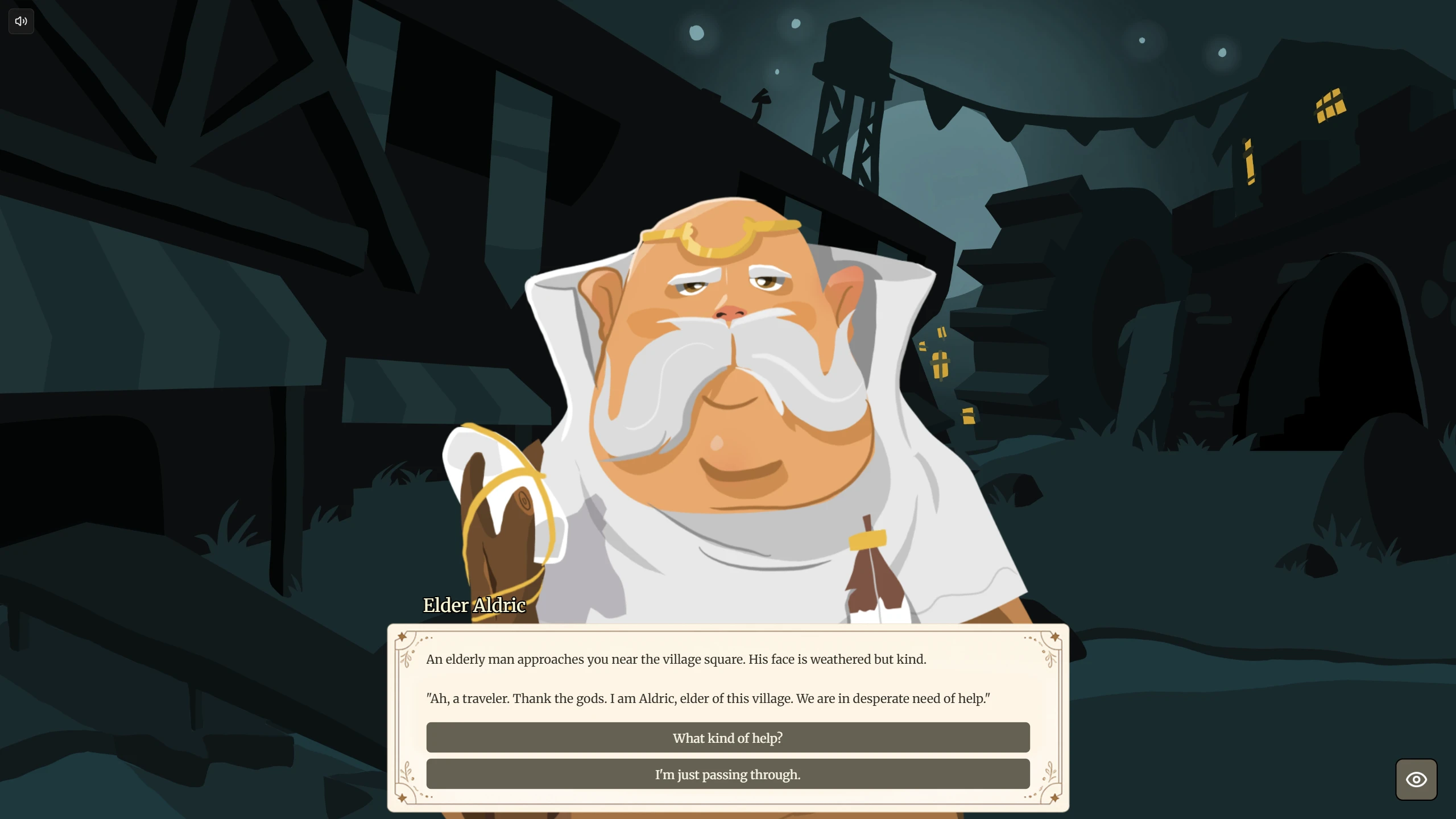
For hub-and-spoke or node graph patterns, visual editors are almost mandatory. StoryFlow Editor handles Blueprint-style visual editing, stores everything in Git-friendly text files (huge for version control), and lets you export to HTML instantly for testing without touching your game engine.
When you are ready to wire it into a game, the runtime is already written for you. The free, open-source plugins import the exported graph and play it natively: the Unreal Engine 5 plugin (Blueprint and C++, StartDialogue()), the Unity package (C#, StartDialogue(), MIT-licensed), and the Godot 4 plugin (pure GDScript with typed signals). Edits in the editor stream to the running game over WebSocket - see the game engine integration docs and live sync for the wiring.
For simpler patterns, you might be fine with a JSON-based system and some custom tooling.
The key is: match your tools to your architecture, not your architecture to your tools.
Step 4: Migrate Incrementally
Don't try to rebuild everything at once. That way lies madness and missed deadlines.
Pick your simplest conversation. Migrate that. Test thoroughly. Make sure your new system works.
Then migrate the next conversation. Then the next.
If you hit problems, you've only broken one conversation, not your entire game.
Best Practices: Building Maintainable Dialogue From Day One
Let me give you the checklist I wish I'd had when I started:
1. Plan Before Coding
Flowchart your first 10 conversations before you write a line of code. Identify your pattern early. If you start with hub-and-spoke and then try to add parallel tracks later, you'll rewrite everything.
2. Separate Data From Logic
Never hardcode dialogue strings. Not once. Not "just this one time for testing." The moment you hardcode one string, you'll hardcode ten more, and then you're stuck.
3. Version Control From the Start
If you're working in a team, use Git-friendly formats from day one. This is why StoryFlow Editor uses text-based files that Git can merge, not binary blobs that cause conflicts.
4. Test Early and Often
Build a "jump to conversation" debug menu in your first week. Being able to test any dialogue instantly will save you hundreds of hours over development.
5. Document Your Structure
Six months from now, you won't remember why NPC_Guard_3 has a special connection to Quest_7. Write it down. Comment your graphs. Maintain a high-level map.
Real-World Example: How a Shipped Game Handles Branching
Here is something concrete. Night in the Woods runs its dialogue on Yarn Spinner, the open-source dialogue tool the developers built and now maintain. The decisive design move is the separation: as Secret Lab, Yarn Spinner's maintainers, describe it, "just about all of the gameplay logic is driven through Yarn Spinner." Dialogue is authored as nodes that emit lines, options and commands; the game reacts to those commands. The script is data the engine consumes, not C# the writers have to touch.
Across the game you can see the five patterns layered for different jobs:
For town conversations: Hub-and-spoke. You talk to townsfolk, they have two to four topics available, you exhaust them, move on.
For the main story: Branch and bottleneck. Your choices change how scenes play out, but you always hit the same major story beats.
For character relationships: Parallel tracks. Mae's relationships with Bea, Gregg, and Angus progress independently based on who you spend time with.
The result is a game with meaningful choices that feels personal and branching, on a dialogue system that stays manageable to build and test. They didn't try to make every choice branch the entire story. They chose patterns that matched their goals and executed them well.
Your Action Plan: Avoiding the Nightmare
Let me give you clear next steps based on where you are:
If you're starting fresh:
- Choose your narrative pattern (from the five above)
- Set up data separation from day one (JSON or visual editor)
- Prototype 2-3 conversations before committing to your architecture
- Set up version control immediately
- Build debug tools early (jump to any conversation)
If you're currently stuck in the nightmare:
- Stop adding features - fix your architecture first
- Extract dialogue data this week (seriously, this week)
- Map your current structure on a whiteboard
- Identify which pattern you're actually building
- Plan an incremental migration path
- Consider visual tools if you're beyond 50 nodes
Choosing the right tools:
For prototyping and planning, start with a whiteboard or Figma to map out your dialogue structure. Get the architecture right before worrying about implementation.
For implementation, StoryFlow Editor was built specifically to solve these problems. The Blueprint-style visual node editor matches how game developers think about branching narratives, it integrates with your Git workflow through text-based storage, and the HTML export means you can easily share and test your interactive stories independently from your game engine. If you're coming from Unreal Engine, the interface will feel immediately familiar.
The important thing isn't which specific tool you use - it's that you plan for exponential growth from the beginning.
Conclusion: The Nightmare is Optional
Here's what I want you to take away from this:
The branching dialogue nightmare isn't caused by bad coding. It's not caused by lack of experience. It's caused by architectural mismatch - trying to implement an exponentially branching system with linearly organized code.
Every experienced developer has built the if/else monster at least once. I have. You probably have. The difference between a nightmare and a success is recognizing the warning signs early and refactoring before technical debt becomes insurmountable.
Visual node systems work because they make problems visible immediately. When you see your tree exploding into 200 tangled connections, you redesign. When it's buried in 3,000 lines of if/else, you just... suffer.
Your dialogue system is a state machine managing exponentially branching paths. Treat it like one. Separate data from logic. Choose proven patterns. Use a branching narrative tool that matches how humans think about narrative branching.
The nightmare is optional. The solution is architectural.
Now go build something that doesn't make you want to quit game dev.
Frequently Asked Questions
Why do branching dialogue systems become unmaintainable?
Branching narratives scale exponentially while procedural code scales linearly. Three choices across five conversations already produces 243 paths (35). A binary tree 10 levels deep has 1,024 endpoints. By node 100, nested if/else logic outgrows what any developer can hold in their head, and adding one branch silently breaks three others.
What are the dialogue system architectures that actually scale?
Five patterns ship in real games: Linear with Branches (a gauntlet of mostly dead-end choices), Branch and Bottleneck (branches that reconverge at fixed beats), Hub and Spoke (a central node with optional topics), Parallel Tracks (independent relationship meters), and Node Graph (any node to any node). Match the pattern to the story.
How do you do branching dialogue in Unreal Engine?
Author the graph in a visual editor, export it as data, then drive it at runtime. The free open-source StoryFlow plugin for Unreal Engine 5.3 to 5.8 imports the file and plays it from one Blueprint or C++ call (StartDialogue()). Branching, characters, choices and variables resolve natively, so no if/else chains live in Blueprint.
How do you do branching dialogue in Unity?
Keep dialogue out of your MonoBehaviours. The free MIT-licensed StoryFlow Unity package (Unity 2022.3 LTS and later, IL2CPP and Mono) imports a story file and plays it with one C# call, StartDialogue(). A default uGUI widget renders it, or implement IStoryFlowDialogueUI for a custom interface. The C# runtime is event-driven.
How do you do branching dialogue in Godot?
Use a data-driven runtime instead of GDScript match statements. The free open-source StoryFlow plugin for Godot 4.3+ is pure GDScript with no C# dependency. It imports a StoryFlow Editor file, plays branching dialogue with characters and variables, and broadcasts every state change through typed signals any Control node can listen to.
Dialogue tree vs state machine: which should you use?
A dialogue tree models one conversation's branches; a state machine tracks the conditions that gate them. You need both. The tree is the graph of nodes and choices. The state machine is the variables (quests, reputation, flags) that decide which branches appear. Treating the tree as the whole system is why first attempts collapse.
What is a data-driven dialogue system?
One where dialogue lives as data (JSON, a graph file, a rule table) separate from engine code, so writers edit it without touching scripts. Valve's Source dialogue system matches thousands of world facts against a rule database to pick lines. The same separation lets you localize and test without recompiling the game.
Can you build branching dialogue without writing code?
Yes, with a visual node editor. Tools like StoryFlow Editor let you compose the entire dialogue graph by dragging nodes onto a canvas, the same way Unreal Engine's Blueprints expose programming visually. Conditional logic lives in the nodes where it affects the outcome, giving you the power of code without the syntax.
How do you refactor an existing if/else dialogue nightmare?
Work in four steps. Extract every dialogue string out of game logic into a JSON file or visual editor. Map your current structure on a whiteboard. Identify which of the five architectures it actually wants to be. Then migrate one conversation at a time so a mistake breaks one scene, not a multi-month rewrite.
Ready to see what visual dialogue design looks like? Try StoryFlow Editor on Steam and start building maintainable dialogue systems with our Blueprint-style visual editor. No more if/else nightmares - just clear, visual, maintainable dialogue trees.
Related Posts
Enjoyed this post?
Subscribe to get notified about new articles and updates.