Features / Localization
Translate Your Game in One Place
Every line a player can read is collected into one table. Translate it yourself or send a spreadsheet to a translator, then ship each language with the game.
How It Works
From the first string to a shipped language
Automatic
Strings are collected for you
CSV + Excel
Send a sheet out, import it back
Every Export
HTML, desktop and all three engines
One Table
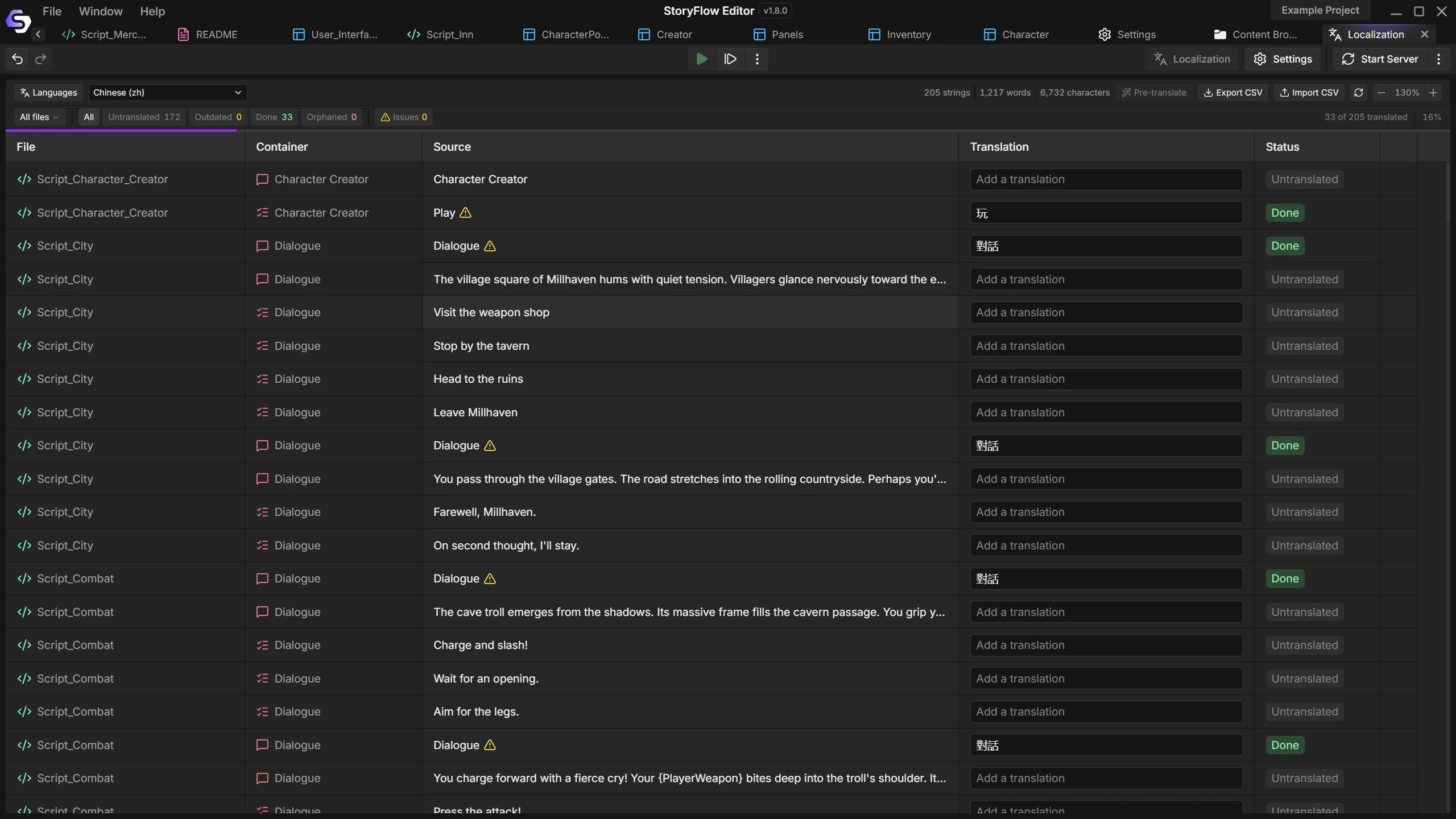
Game text hides everywhere: a dialogue line, a choice, a button label, a tooltip, an item description in a database.
The dashboard gathers all of it, with a column per language. Each row shows where it comes from, and one click takes you there.
- Filter by file or by status
- Search source text and translations
- Jump from a row to its node

Change Tracking
Writing does not stop when translation starts. Edit a translated line and its translations are flagged as outdated, with the old source shown beside the new.
Progress per language shows what is finished, what is missing and what needs another look.
- Outdated translations are flagged
- Missing placeholders are caught
- Progress for every language
Built for Translators
Export a language to a spreadsheet, send it out and import the result. You see every change before it is written.
Variables stay as placeholders a translator can move within the sentence, and repeated text reuses the translation you already wrote.
Nothing Gets Missed
What the dashboard handles for you
No tagging
If a player can read it, it is in the table. That includes interface text and tooltips.
Translate in place
Type into the table and move straight to the next untranslated row.
Translation memory
The same source text gets the translation you already wrote, so repeated lines stay consistent.
Runtime switching
Change language while the game runs, in the exports and in every engine plugin.
Language menus
Script nodes list your languages and switch between them, for a settings screen in your own style.
Source text editing
Export the original text for an editing pass and import it with a review of each change.
Documentation
Guides for the editor and each engine

Questions
Everything a player reads: dialogue, text blocks, choices, character names, string variables, interface text, tooltips and text in databases. You do not tag anything.
Its translations are flagged as outdated and keep the source they were written against, so you can see what changed.
Yes. Export a language as a spreadsheet, send it and import the file you get back. Both CSV and Excel are accepted.
Yes. The HTML and desktop exports and all three engine plugins switch language at runtime.
More Features
Join the Community
Connect with StoryFlow Editor users, share your projects, leave feedback, vote for new features, report bugs and get support in our Discord community.
Join Discord