Looking for a Ren'Py Alternative?
If the scripting is the part you want to skip, StoryFlow Editor keeps the whole visual novel visual. Characters, dialogue, choices, variables and branching as nodes on a canvas. Export a playable HTML build or take the same story into Unity, Unreal Engine and Godot.
Why writers look for a Ren'Py alternative
Ren'Py is the default visual novel engine for good reason. It is free, it has shipped hundreds of commercial games, and the first hour with it feels effortless. The searches for an alternative almost always come from the same place: the hour after that.
"No code" runs out. Writing label start: and a few dialogue lines is not coding in any meaningful sense. But the first time you need a scene to remember a choice from an hour ago, you are writing conditionals, then defaults, then screens, and the project has quietly become a programming project with prose in it.
You cannot see the branches. A Ren'Py story lives in script files. There is no map. Once a route has three endings and a dozen flags, the only way to know whether a path is reachable is to play it, and dead branches can sit undetected until a player finds them.
It only makes visual novels. That is a strength if a visual novel is what you are making. If the branching dialogue is one system inside a larger game, Ren'Py is the wrong shape, and the writing has to move somewhere your engine can read.
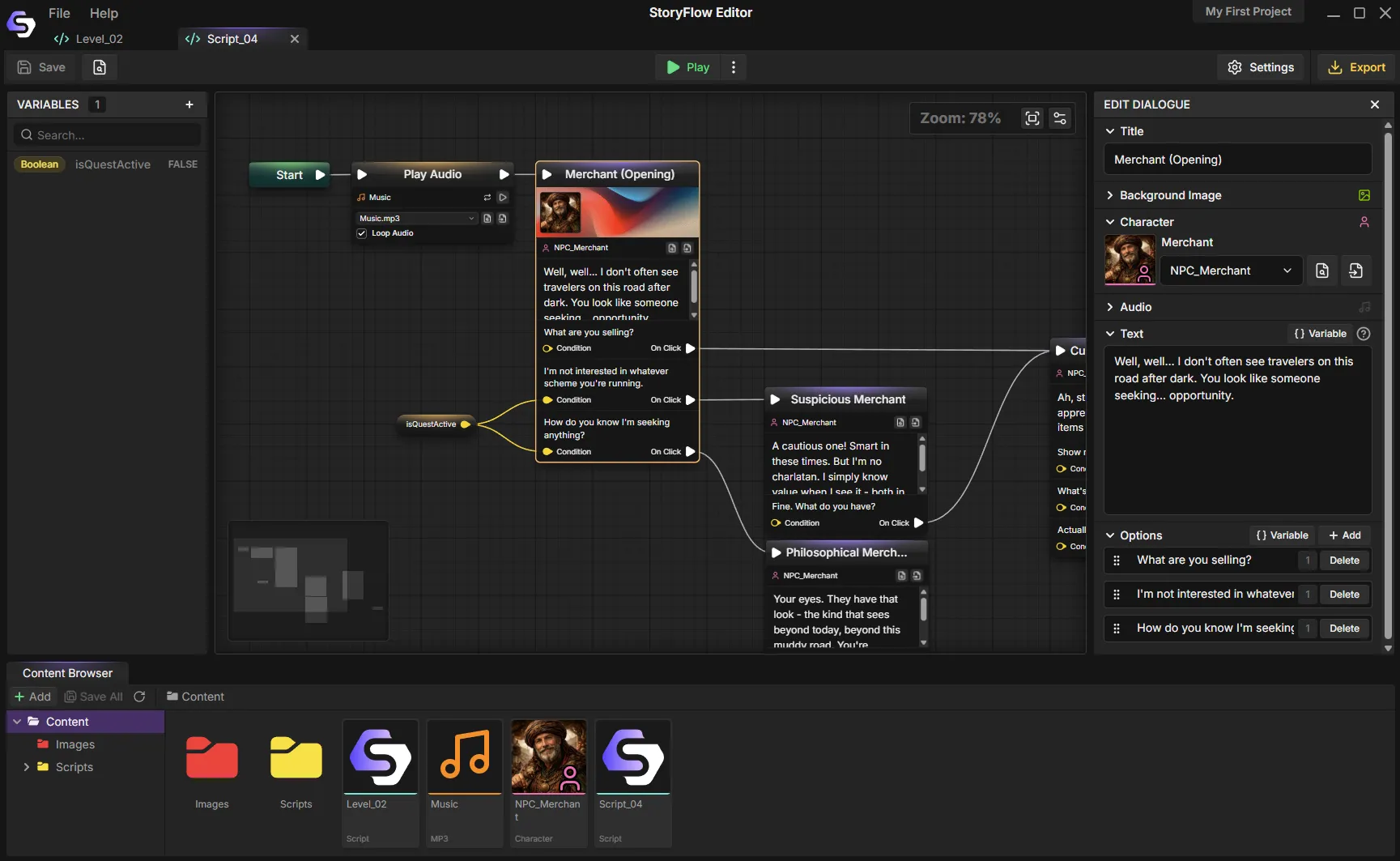
Every route, flag and ending visible at once, with no script files to trace.
StoryFlow Editor vs Ren'Py at a glance
These tools overlap less than they look. This is where they actually differ.
| Feature | StoryFlow Editor | Ren'Py |
|---|---|---|
| Price | $30 one-time, lifetime updates | Free, open source |
| Branching logic | Visual nodes, no syntax | Ren'Py script, Python for advanced use |
| Learning curve | Visual from start to finish | Gentle at first, steepens with logic |
| Seeing story shape | Node canvas with grouping and minimap | Script files, no visual map |
| Characters and portraits | Built-in character system | Built in, defined in script |
| Audio | Built in with looping and volume | Built in, full control |
| Save and load UI | Build your own menu with Save System nodes | Complete UI included |
| Settings menus and gallery tools | Build menus in the UI editor | Settings menu plus gallery and replay APIs |
| Web export | One-click standalone HTML | Web build supported |
| Mobile export | Via Unity, Unreal or Godot | Android and iOS built in |
| Unity, Unreal, Godot plugins | Free, open-source for all three | Not applicable, own engine |
| Iteration workflow | Sync imported data; Godot and Unreal need a fresh play session | Hot reload of script |
| Best for | Visual stories for HTML, desktop or game engines | Visual novels with ready-made game systems |
| Track record | Newer, indie focus | Doki Doki Literature Club and many Steam VNs |
Where Ren'Py still wins
Both can produce playable games. Ren'Py provides more visual novel features out of the box, while StoryFlow Editor lets you build the interface visually and also send the narrative to other engines.
- It is free. No purchase, no licensing, commercial use included. For a first project with no budget that is decisive.
- Its visual novel features are ready-made. Save and load menus, preferences, transitions, rollback and text speed are included. Its gallery and replay APIs provide tools for building custom galleries. In StoryFlow Editor you build menus and presentation in the UI editor.
- It builds for everything. Windows, macOS, Linux, Android, iOS and web out of one project, with a packaging pipeline aimed at Steam and itch.io.
- The ceiling is Python. Anything you can imagine, you can write, because underneath it is a real programming language with a mature API.
If you are making a visual novel and you are comfortable in script, Ren'Py is very hard to beat. The case for StoryFlow is that the branching stays visual, and that the same story can leave the visual novel format entirely.
Where to go next
The no-code visual novel guide builds a branching scene from scratch in about 30 minutes and compares Ren'Py, TyranoBuilder, Naninovel and StoryFlow honestly on where each one stops being code-free.
If you are still deciding what kind of tool you need, the branching narrative tool overview covers the six capabilities that matter once a story gets big, and the Twine comparison covers the same ground from the interactive fiction side.
Frequently Asked Questions
Is StoryFlow Editor a good Ren'Py alternative?
It depends what you want to replace. If you want a visual novel engine with ready-made save menus and settings plus gallery and replay tools, Ren'Py is still the more complete package and it is free. If you want to design branching without Ren'Py script, StoryFlow Editor uses visual nodes and exports a playable HTML build or a JSON project build for Unity, Unreal Engine and Godot.
Do you need to code to use Ren'Py?
Ren'Py is often described as no-code, and the first hour genuinely is. You write labels, dialogue lines and menus in a script file. But conditionals, variables, screens and anything custom drop you into Ren'Py script and eventually Python. For a lot of writers that is the point where a visual novel stops being a writing project. StoryFlow keeps conditions and variables as nodes, so branching stays visual however complex the story gets.
Is StoryFlow Editor free like Ren'Py?
No. Ren'Py is free and open source. StoryFlow Editor is a one-time $30 purchase on Steam or itch.io, with lifetime updates and free open-source plugins for Unity, Unreal Engine and Godot. A free demo is on Steam. This is a genuine trade-off worth naming: you are paying to keep the branching visual and to get the engine pipeline.
Can I make a visual novel without coding at all?
Yes. In StoryFlow Editor the whole workflow is visual: add characters with portraits, drop dialogue nodes on the canvas, connect choices, track variables with typed nodes and branch on them, then hit play to test the path. Nothing in that loop requires a scripting language. The visual novel guide walks through building a branching scene in about 30 minutes.
What does Ren'Py do better than StoryFlow Editor?
Ren'Py is purpose-built for visual novels: it ships ADV and NVL display modes, ready-made save and load menus, preferences, gallery and replay APIs, transitions and effects plus builds for Windows, macOS, Linux, Android, iOS and web. StoryFlow Editor can also export playable HTML and desktop games, but you build your own menus with its UI editor. Ren'Py has a longer record of commercial visual novels and community resources.
Can I use both Ren'Py and StoryFlow Editor together?
Some people do, using StoryFlow Editor to design and test the branching structure visually, then implementing the final game in Ren'Py with the structure already proven. There is no automated exporter to Ren'Py script, so this is a design-then-build workflow. For a direct engine import, use the Unity, Unreal Engine or Godot plugin with a StoryFlow Editor project export.
Build your visual novel visually
StoryFlow Editor is a one-time $30 purchase on Steam and itch.io. The Steam demo is free, so you can build one branching scene and see whether working without a script file suits you.
Join the Community
Connect with StoryFlow Editor users, share your projects, leave feedback, vote for new features, report bugs and get support in our Discord community.
Join Discord