Looking for a Twine Alternative?
StoryFlow Editor keeps branching visual all the way down. No passage macros, no story format to pick, and typed variables you can see. Export a playable HTML file just like Twine, or drop the same story straight into Unity, Unreal Engine and Godot.
Why writers look for a Twine alternative
Twine is genuinely good software and it is free, which makes it the default first stop for anyone writing branching fiction. Most people who go looking for an alternative are not unhappy with Twine as a writing tool. They have hit one of three specific walls.
The markup creeps in. Twine starts visual: passages and links, nothing to learn. Then you need a condition, and you are writing (if: $trust > 3) inside your prose. Then you need a counter, an inventory, a reputation score, and the passage that was a scene is now half logic. The visual part of the tool stops describing what the story actually does.
The map stops being readable. A Twine story map is great at 20 passages. At 200 it is a wall of boxes and crossing lines, and you cannot see which branches converge or which are dead ends without tracing them by hand. Structure is the thing you most need to see in a branching story, and it is the first thing to go.
The exit is web-only. Twine publishes a self-contained HTML file, which is perfect until you want the story inside a game with characters, audio and a real UI. Getting a Twine story into Unity or Godot means a third-party runtime or a rewrite, and the story stops being the source of truth.
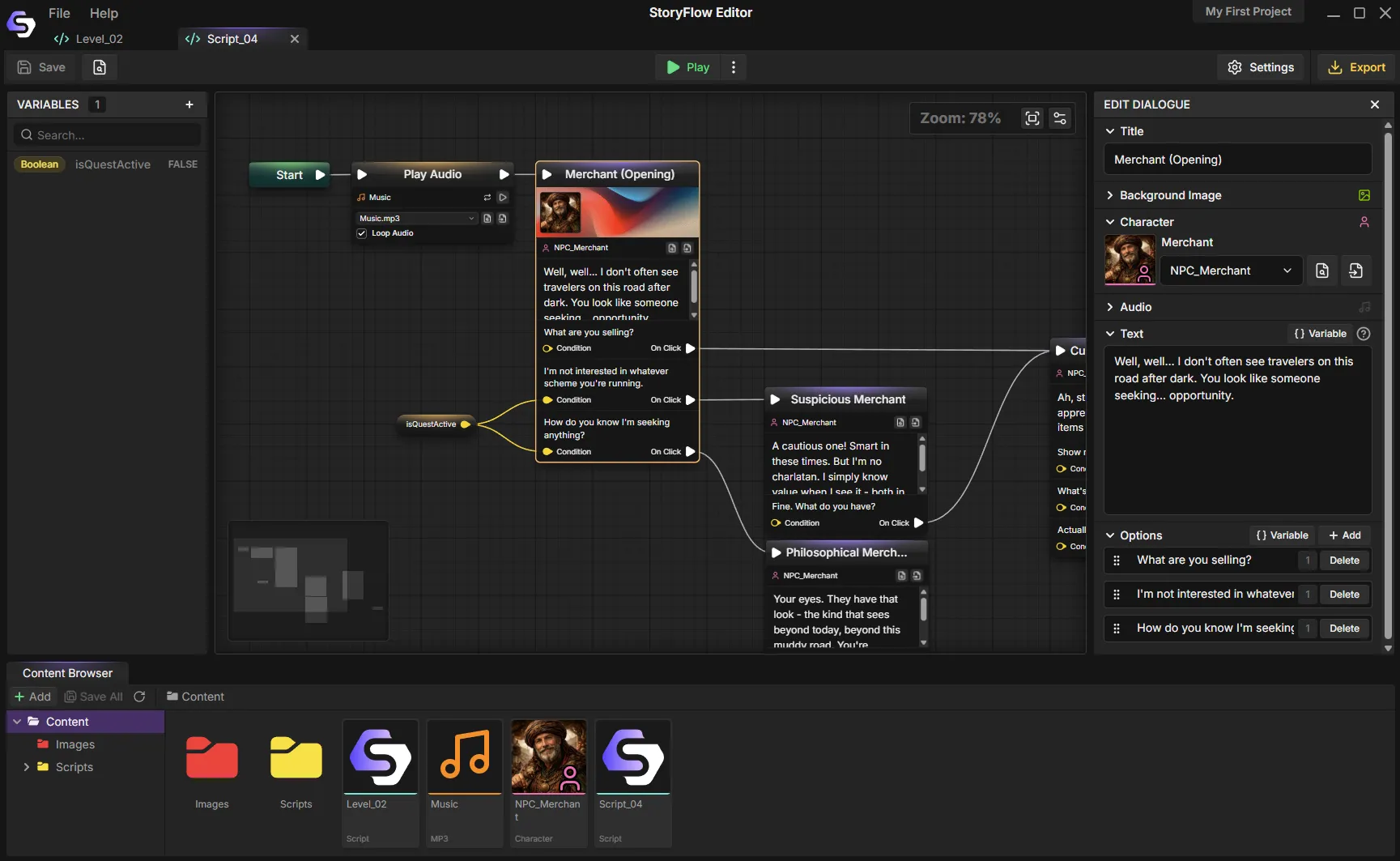
Conditions and variables live in nodes, not in the prose.
StoryFlow Editor vs Twine at a glance
The differences that actually change your day-to-day writing.
| Feature | StoryFlow Editor | Twine |
|---|---|---|
| Price | $30 one-time, lifetime updates | Free, GPL-3.0 |
| Where it runs | Desktop app (Windows, macOS, Linux) | Browser or desktop app |
| Branching logic | Visual nodes, no syntax | Harlowe or SugarCube macros |
| Seeing story shape | Node canvas with grouping and minimap | Passage map, harder to read at scale |
| Variables | Typed (string, int, float, bool, enum) | Untyped, set in passage markup |
| Characters and portraits | Built-in character system | Manual, via HTML and CSS |
| Audio | Built in with looping and volume | Story format dependent |
| Web export | One-click standalone HTML | One-click standalone HTML |
| Unity plugin | Free, open-source | Third-party runtimes only |
| Unreal Engine plugin | Free, open-source | Third-party runtimes only |
| Godot plugin | Free, open-source | Third-party runtimes only |
| Live sync to engine | WebSocket sync while the game runs | Not applicable |
| Community and tutorials | Newer, smaller | Large, well established |
| Story formats | One consistent editor | Harlowe, SugarCube, Chapbook, Snowman |
Where Twine still wins
An honest comparison has to include the cases where you should just use Twine. There are four.
- It is free and open source. GPL-3.0, no purchase, no account. For a game jam, a class assignment or a first experiment, that matters more than any feature.
- Nothing to install. Twine runs in a browser. You can start writing on a machine you do not own, which no desktop editor can match.
- The community is enormous. Years of tutorials, story formats, CSS templates and answered questions. If you hit a problem in Twine, someone has already written it up.
- Macros are power, if you want them. SugarCube in particular lets a comfortable writer do genuinely sophisticated things. Visual nodes trade some of that ceiling for readability.
If you are writing text interactive fiction for the web and the markup does not bother you, stay on Twine. The case for switching is about visual logic and getting the story into a game engine.
How to move a Twine story to StoryFlow Editor
There is no automated importer. The manual path takes an afternoon for a small story, and most of it is copy and paste.
- Open your Twine story map as a reference. You already made the hard decisions about structure. This is a transcription job, not a redesign.
- List your variables first. Anything you
(set:)in Twine becomes a typed variable in StoryFlow. Deciding whether each one is a number, a string or a boolean usually surfaces a bug or two. - Rebuild passages as dialogue nodes. Prose copies straight over. Links become connections you drag between nodes.
- Turn macros into condition nodes. This is the part that pays off. Every
(if:)buried in a passage becomes a visible branch you can see and test on the canvas. - Export. One-click HTML gets you back to where Twine left you. From there the Unity, Unreal Engine and Godot plugins open up if you want them.
If you are weighing up the wider category first, the branching narrative tool overview covers what to look for, and the narrative design tools comparison scores six tools including Twine side by side.
Frequently Asked Questions
Is StoryFlow Editor a good Twine alternative?
Yes, if what you want from Twine is the branching structure without the markup. Twine is excellent for browser-based interactive fiction and it is free, but real logic in Twine means writing Harlowe or SugarCube macros inside your passages. StoryFlow Editor keeps branching, conditions and variables visual as nodes on a canvas. It exports playable HTML and a JSON project build for Unity, Unreal Engine and Godot.
Why do people look for a Twine alternative?
Three reasons come up repeatedly. The passage markup stops feeling like writing once a story needs conditionals and state. The link-based structure gets hard to read at scale, because you cannot see the whole shape of a large story at once. And the output is web-first, so taking a Twine story into a game engine means finding a third-party runtime or rebuilding it.
Can I import my Twine story into StoryFlow Editor?
There is no automated importer. Most people rebuild the flow in StoryFlow using the Twine story map as a reference, which goes faster than expected because the structure is already decided. Passage text copies across directly, and Twine variables map onto StoryFlow's typed variables with the same names.
What does Twine do better than StoryFlow Editor?
Twine is free and GPL-3.0 licensed, runs in a browser with nothing to install, and has a large community with years of tutorials and story formats behind it. It publishes a self-contained HTML file with no build step, which is hard to beat for a quick prototype or a game jam. If you are writing pure text interactive fiction for the web and you are comfortable with its macros, Twine is still an excellent choice.
Is StoryFlow Editor free like Twine?
No. StoryFlow Editor is a one-time $30 purchase on Steam or itch.io, with lifetime updates and no subscription. The engine plugins for Unity, Unreal Engine and Godot are free and open-source. A free demo is available on Steam if you want to try the workflow before buying. Twine is free, so this is a real trade: you are paying for the visual logic and the engine pipeline.
Can StoryFlow Editor publish to the web like Twine does?
Yes. HTML export produces a playable build folder you can upload to itch.io or another web host. Keep its assets folder alongside index.html. The same StoryFlow Editor project can also produce a JSON build for Unity, Unreal Engine and Godot.
Try it on your next branching story
StoryFlow Editor is a one-time $30 purchase on Steam and itch.io. The Steam demo is free, so you can rebuild one Twine scene and see whether the visual approach fits how you write.
Join the Community
Connect with StoryFlow Editor users, share your projects, leave feedback, vote for new features, report bugs and get support in our Discord community.
Join Discord