
StoryFlow Plugins for Unreal, Unity and Godot Are Here
When I first launched StoryFlow Editor in November 2025, one of the most common questions I received was: "How do I get my dialogue into my game?" At the time, the answer was HTML and JSON export - functional, but requiring developers to build their own integration layer. Today, that changes.
StoryFlow Editor - a node-based visual scripting tool for building branching dialogue and interactive stories without code - now has free, open-source plugins for Unreal Engine, Unity and Godot 4 - covering all three major game engines. This is a milestone I've been working toward since the very beginning of this project, and I'm thrilled to finally deliver on it.
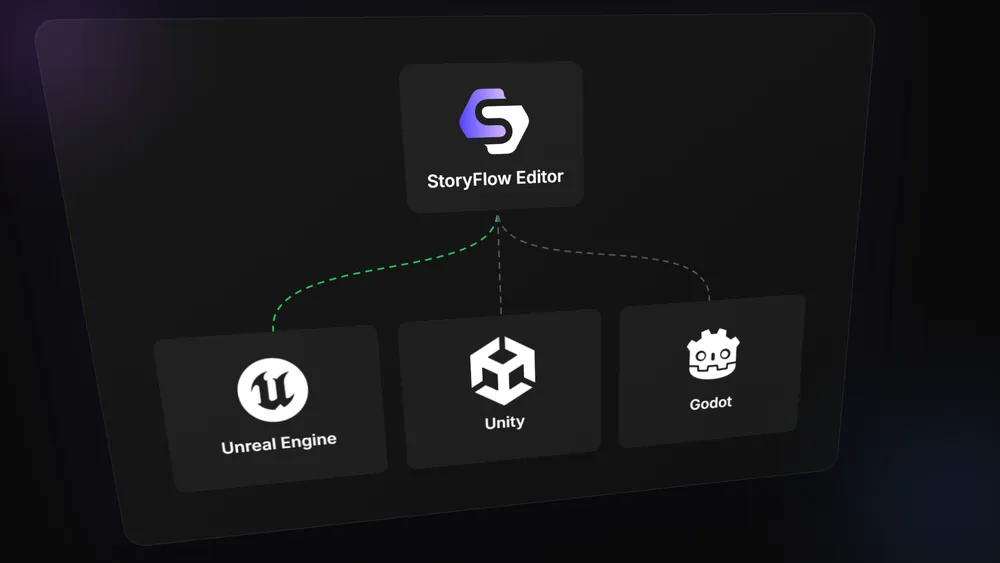
What's Included in Each Plugin
These aren't bare-bones importers. Each plugin is a complete dialogue system runtime that handles the full StoryFlow feature set:
- Full dialogue system - display dialogue text, character names, portraits and player choices
- All 160+ node types - branching, variables (boolean, integer, float, string, enum, arrays), arithmetic, comparison and logic nodes all work out of the box
- Character system - import characters with names, portraits and per-character variables
- Audio playback - voice acting and sound effects attached to dialogue nodes
- Save and load - persist dialogue state, variables and progress
- Live sync via WebSocket - edit dialogue in StoryFlow Editor and see changes reflected in your running game in real time
- Customizable UI - each plugin provides a default dialogue UI that you can restyle or replace entirely
Unreal Engine Plugin
The Unreal Engine plugin supports UE 5.3 through 5.7 with full Blueprint and C++ API access. If you've worked with Unreal before, the integration follows familiar patterns - components, delegates and subsystems. You can drive dialogue entirely from Blueprints without writing a single line of C++, or drop down to the C++ API for full control.
Unity Plugin
The Unity plugin is a C# package that integrates through Unity's standard package workflow. It provides a clean scripting API with events for dialogue updates, choice selection and variable changes. The included sample scene gets you from import to playable branching dialogue in minutes.
Godot 4 Plugin
The Godot plugin is written in pure GDScript with no external dependencies - it works with the standard Godot 4 build, no .NET version required. Signals, exported properties and a node-based architecture make it feel native to Godot's workflow. A C# version of the plugin is also planned for developers using Godot's .NET build.
All Plugins Are Free and Open-Source
Every plugin is released under the MIT license on GitHub. No additional cost, no license keys and no per-seat fees. If you own StoryFlow Editor, you have everything you need to ship your game on any of the three engines.
This was a deliberate decision. The plugin shouldn't be a paywall between your story and your game. The editor is the product - the plugins are the bridge.
Getting Started
Each integration has its own documentation with installation guides, quick start tutorials and API references:
- Unreal Engine - Plugin Overview & Documentation
- Unity - Plugin Overview & Documentation
- Godot 4 - Plugin Overview & Documentation
If you're new to StoryFlow Editor, the quick start guide will get you from zero to a working dialogue tree in about 5 minutes. From there, you can export your project and import it into whichever engine you're using to build your interactive story.
What's Next
With game engine integration shipped for this narrative design tool, my focus is shifting to the features you've been asking for most: localization support, a built-in UI editor for customizing dialogue appearance without code, and an animation system for text effects and transitions. You can follow development on the changelog or join the community on Discord.
Thank you to everyone who supported StoryFlow Editor through the early days when it was export-only. This milestone wouldn't have happened without your feedback, bug reports and patience. Now go build something great.
Related Posts
Enjoyed this post?
Subscribe to get notified about new articles and updates.